| |
|
| |
 |
Welcome to your Little Reader FREE Trial! |
|
| |
 |
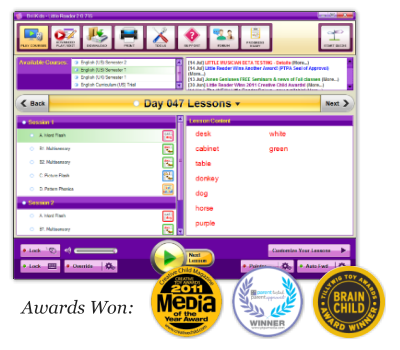
Thank you for giving Little Reader a try!
We're here to guide you every step of the way!

 |
|
| |
|
| |
|
How to Install Little Reader |
|
| |
|
Download the Software.
1. Visit your Account Management Page and download the Little Reader software.
2. After downloading, click on the file to start the installer.
3. Follow the prompts to complete installation.
Need help? Contact our BrillKids Support Team |
|
| |
|
| |
|
How to Get Support |
|
| |
|
Need a bit of help?
Just in case you have questions, there are several ways in which you may reach us:
|
|
| |
|
| |
|
What to do first... |
|
| |
|
The Beginner's Tutorial
Read through the Beginner's Tutorial in your Little Reader's Start Guide to read a welcome message from the BrillKids Founder, along with a few basic things you should know about teaching with Little Reader. |
|
| |
|
| |
|
Just in case you're a little lost... |
|
| |
|
Download your 2 FREE eBooks
|
|
| |
|
|
| |
|
|
| |
 |
IN THIS EMAIL:
- Your Little Reader Trial
- How to Install
- Getting Help |
| |
|
|
| |
|
Connect with us!
There are so many ways you can reach us and stay updated with the latest discounts and products.
Just choose the social networking site you use the most, and chances are, we're there! |
| |
|
|
| |
|
FREE FLASH CARDS |
| |
|
At BrillKids, we want to give you all the tools you need to start teaching your child today.
This is why we've worked so hard to create all these free downloadable flash cards for you!
|
| |
|
|
| |
|
|
|
|